

How to Find Local Businesses Without a Website (Free Method)
Search a trade and city on Google Maps, open each listing, and note those with no website link or only a Facebook page. Check the law before contacting anyone. I’m Viktor Szabó, and when my team tested this with Google’s official Places API on a few home-service trades in US cities, most well-reviewed businesses already had a website, and the few without one had no email we could find.
You don’t need a paid lead tool to find businesses without websites. Google Maps already shows you, for free. Here’s the by-hand method, where AI helps, what my own test showed, and the legal and Google rules most guides skip.
It’s for web designers looking for clients, and for business owners wondering why they keep getting “your website could be better” emails.
How to find businesses without a website on Google Maps (free, by hand)
Local businesses show up on Google Maps through their Business Profile, which the owner can claim and fill in, including a website (Google Business Profile Help). When a profile has no website on it, the listing has no website link. That gap is what you’re looking for.
- Pick one trade and one area. For example, house painters in one town or one part of a city. One trade at a time keeps your notes easy to compare.
- Search it on Google Maps. Type the trade and the place into the search box and open the list of results.
- Open each listing. Click a business to see its full profile.
- Look for the website link. Most listings show a Website button or link near the Directions button. No website link means it’s a candidate.
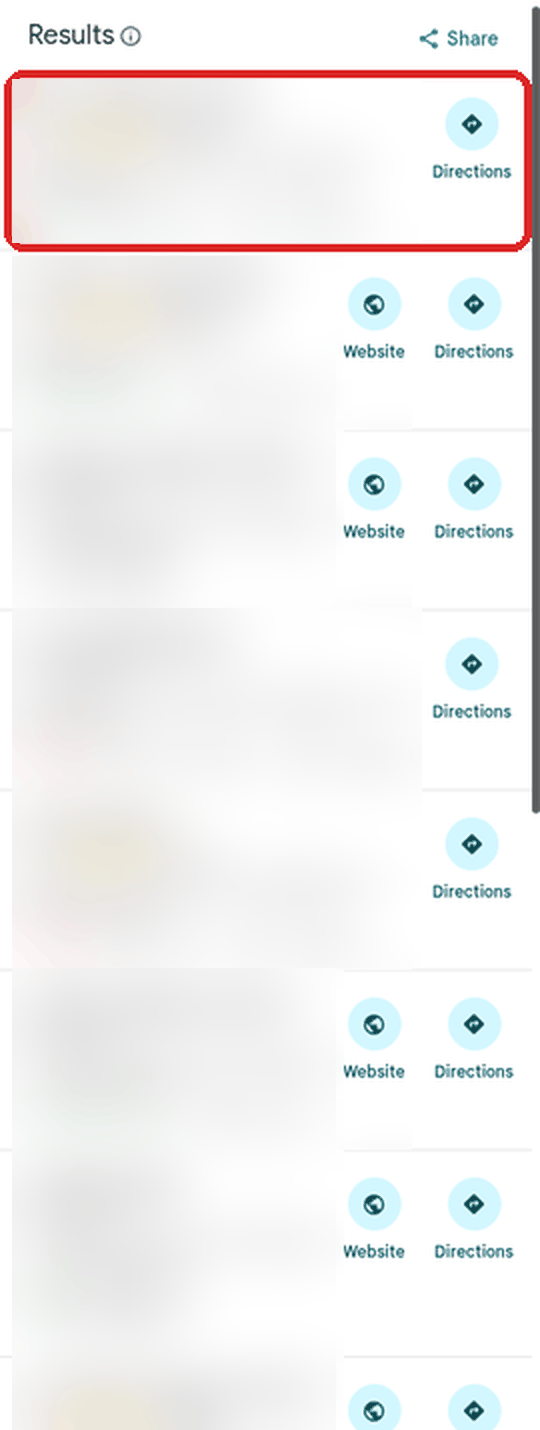
Real screenshot. A Google Maps results list: the outlined listing has no Website button. Names and details blurred. - Note “Facebook-only” listings. Some owners put a Facebook or other social page where the website should be. Count those as “no website of their own”.
- Check the rating and reviews. Only shortlist businesses that are open, well rated and have a fair number of reviews, so you’re looking at active businesses, not abandoned listings.
- Keep your notes small. Note only the businesses you’d actually contact, and take contact details from the business itself, not from a copied list of Maps data (see Google’s rules below).
Find businesses without a website: by-hand checklist

[ ] One trade + one area per search
[ ] Open each listing on Google Maps
[ ] No website link? Mark it "no website"
[ ] Only a Facebook or social page? Mark it "Facebook-only"
[ ] Open, well rated, a fair number of real reviews? Keep it
[ ] Contact details taken from the business itself, not copied from Maps
[ ] Check the email law for where they are BEFORE any contact
[ ] A person reads and approves every message before it goes out
Can AI do the searching for you?
Partly. AI can sort and score a shortlist, check a business’s own website for basics (does it work on a phone, is there a clear way to call or ask for a quote), draft a sample page, and draft an email for a person to approve. What it shouldn’t do is send anything on its own. In my setup, nothing goes out to a real person without my yes.
To search at a bigger scale, the official route is Google’s Places API. It’s pay-as-you-go, with a free monthly usage cap on each type of request (Google Maps Platform pricing), and it has rules about what you may store. Tools that copy data out of Google Maps pages are a different thing, and Google’s terms forbid them.
What I found when I tested it
On 25 October 2026, my team of Grok Bots (AI agents I run, each with one job) tested this method for me. We used Google’s official Places API, not a scraper. We searched a few home-service trades (painters, pressure washing, landscaping and house cleaning) in a few US cities. We kept only businesses that were open, well rated and had a fair number of reviews, and left out obvious chains and franchises. Nothing was emailed, and no business was contacted.
Here’s what we found:
- Most businesses already had a website. Only a handful had no website at all, and a few more had just a Facebook page.
- Most of the sites that did exist showed no obvious problems on our basic checks. Our checks were rough, though: things like a clear call button or quote form, a phone-friendly layout, an old copyright year, and certificate or HTTPS problems. They didn’t judge design.
- The businesses with no website, or only a Facebook page, had no email we could find. We didn’t check their Facebook pages. Reaching them would mean a phone call or a letter, not an email.
- Google tends to show the most prominent businesses first. Google says it combines “primarily relevance, distance and prominence” to rank local results (Places API policies), and the prominent ones mostly have decent sites. Narrower searches (suburbs, ZIP codes, smaller towns) may turn up weaker sites, but we haven’t tested that yet.
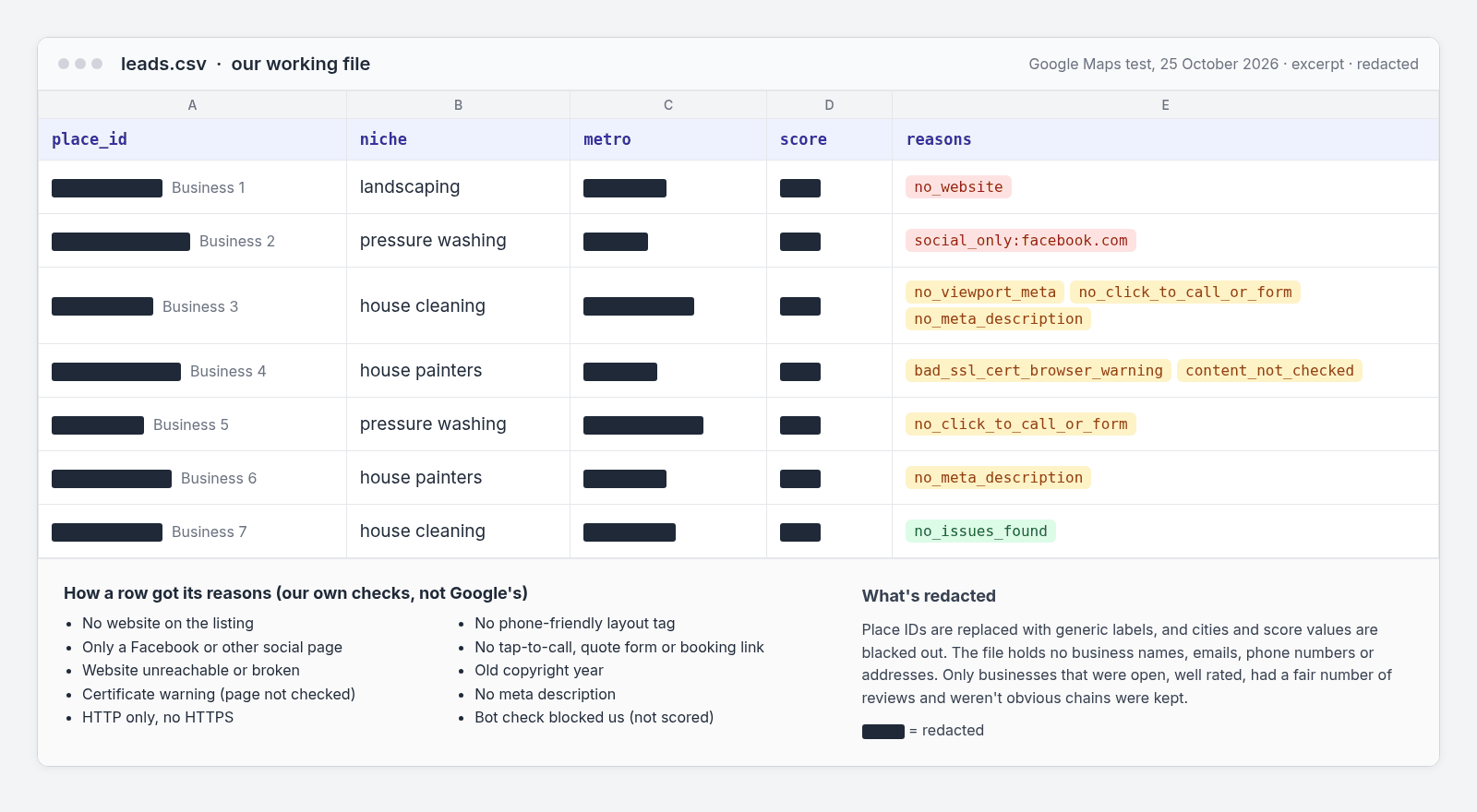
The lesson: in this test, “no website” businesses were rare and hard to reach, which is why I think “weak website” is the better target.
“No website” vs “weak website”: which to target
A business with no website sounds like the perfect client, but it’s harder than it looks. They were rare in the top results we saw, you often can’t email them, and some may not want a site at all if referrals keep them busy.
A business with a weak website is often a better fit. They’ve already decided being online matters, there’s usually a way to contact them on the site, and you can point to something specific, like no tap-to-call button on a phone or a certificate warning.
If you run a business and get these emails, this is likely how you were found: your Maps listing plus a quick automated look at your site. A sender who names one concrete problem has at least looked.
Is it legal to email businesses without a website?
I’m not a lawyer, and this isn’t legal advice. It’s my short summary of what the official sources say. Check with a lawyer for your own situation before you email anyone.
- United States (CAN-SPAM). The FTC says the law covers all commercial email and “makes no exception for business-to-business email.” You need honest sender details and subject lines, a clear statement that it’s an ad, a valid physical postal address, and a clear opt-out that you honour within 10 business days. Each email that breaks the law can cost up to $53,088 (FTC CAN-SPAM guide).
- European Union (GDPR). If you’re based in the EU, the GDPR applies when you process personal data as part of that business, wherever the data is processed (European Commission). So an EU-based sender emailing US businesses still has GDPR duties when a named person is involved.
- Hungary. Under the advertising law (Grt. 6. §), email ads to a natural person need that person’s prior, clear and explicit consent. The media authority, NMHH, checks this (NMHH, in Hungarian). Sole traders (egyéni vállalkozók) are natural persons under Hungarian law, so I’d treat them the same way. Check with a lawyer.
- United Kingdom (PECR). The ICO says companies and LLPs can get marketing emails without consent if you don’t hide who you are and give a valid opt-out address. Sole traders and some partnerships need consent (or the narrow “soft opt-in”). UK GDPR still applies to named contacts (ICO). The ICO notes this guidance is under review after the Data (Use and Access) Act.
My own rule on top of the law: we haven’t emailed anyone from our test, and we won’t until a lawyer has checked the wording.
Is scraping Google Maps allowed?
No. Google’s Maps Platform terms have a section called “No Scraping”: you may not “export, extract, or otherwise scrape Google Maps Content for use outside the Services”, and one listed example is to “copy and save business names, addresses, or user reviews” (Google Maps Platform Terms). The terms for customers with a billing address in the EEA have the same rule (EEA terms).
The terms for everyday Maps users also forbid mass downloading, or using Maps to build a business listings database or mailing list for a service that competes with it (Google Maps Additional Terms).
What you can keep is the place ID: Google’s Places policies say place IDs are exempt from the caching rules and can be stored indefinitely (Places API policies). Our working file kept place IDs plus our own scores and notes, and we don’t publish or sell the list. I won’t recommend scraper tools.
What to do next (if you build sites)
- Shortlist weak sites, not just missing ones. Look at each site on your phone the way a customer would.
- Write down one specific problem per business. “No tap-to-call button on mobile” is useful. “Your site needs work” isn’t.
- Check the law for where the business is, and talk to a lawyer before you send anything.
- Have a person read every message. AI can draft it. You approve it.
I’m building this kind of setup in public, with AI agents doing the legwork and me approving every step. More about me, Viktor Szabó.
Free guides: the guides published on this site are listed on the free guides page.
FAQ
How do I find businesses without websites for free?
Search a trade and a city on Google Maps, open each listing, and note the ones with no website link or only a Facebook page. Keep the ones that are open and well reviewed.
Can I find businesses with no website on Google Maps?
Yes. A listing with no website link, or only a Facebook page, is a candidate. In my team’s test, though, most well-reviewed businesses already had a website.
Is it legal to email businesses I found on Google Maps?
It depends on where they are and where you are. In the US, CAN-SPAM’s rules cover business-to-business email too: honest headers, an ad label, a postal address and a working opt-out. In the EU and UK, consent rules can apply, especially to sole traders, and the GDPR covers named contacts. I’m not a lawyer, so check with one first.
Is scraping Google Maps against the rules?
Yes. Google’s Maps Platform terms forbid scraping, including copying and saving business names, addresses or reviews. Place IDs can be stored.
Should I target businesses with no website or a bad website?
In my test, businesses with no website were rare and had no email we could find, so I’d start with weak websites. Those owners already want to be online, and you can point to a specific problem.
Can AI find businesses without websites for me?
AI can sort a shortlist, check websites for basic problems and draft a sample page or email. For searching at scale, use Google’s official Places API, not a scraper. A person should approve every message.