Email marketing audit for Brevo, with Claude: what it checks, how to run it safely, and the free prompt I made
An email marketing audit compares your recent campaigns to find what worked, what didn’t, and what to fix. With Brevo, Claude can run it for you: connect the official Brevo connector, then paste one audit prompt. The Brevo connector reads your account, contacts, lists and stats, and can create draft or scheduled email and SMS campaigns. It can’t send now, edit existing campaigns, or add or import contacts. You get a table, patterns and three next actions.
Most audit checklists are written for big teams. With Brevo and Claude, you can run a smaller, honest version on your own numbers in one chat. Here’s what it checks, how to connect Brevo safely, and the free audit prompt I made.
What does an email marketing audit check?
An email marketing audit is a look back at your recent sends that ranks them, looks for patterns, and turns what it finds into a short list of changes. For a small list, five checks cover most of it:
Email marketing audit: the 5 checks

1. Top and bottom campaigns: the best and weakest by open rate and by click rate.
2. Subject lines: what stronger subjects have in common (length, questions,
   numbers, personalisation, tone), only where the data supports it.
3. Segments: how each list or segment performed against the others.
4. Deliverability flags: campaigns with bounces, unsubscribes or spam
   complaints well above your usual level.
5. Next actions: three small things to try next, each tied to something in the data.

Compare yourself with your own recent sends, not someone else's averages.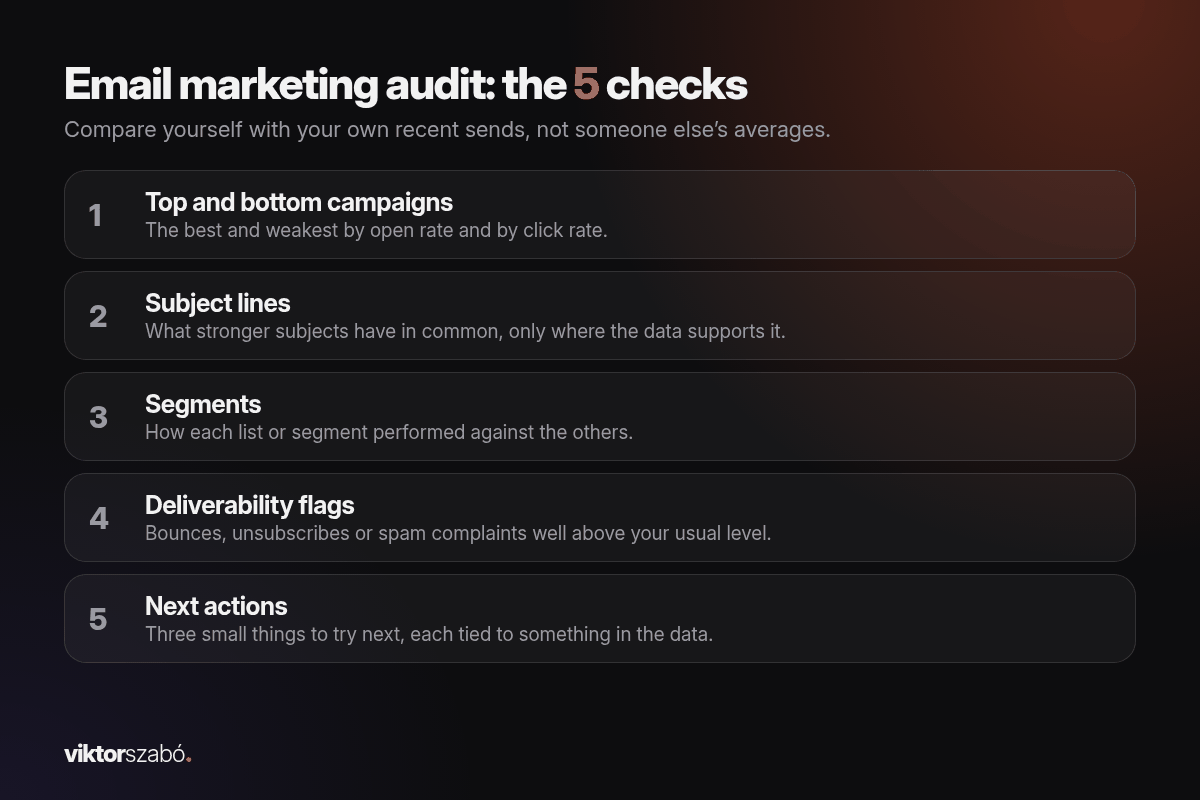
That’s exactly the scope of my free prompt. It doesn’t look at design, automation flows or sign-up forms.
What do you need before you start?
- A Brevo account with some sent campaigns. The prompt pulls your last 10 sent email campaigns, or everything from the last 90 days if that’s fewer. With fewer than 10 campaigns, or fewer than 3 per list, it’s written to rate its own confidence as low.
- Claude. I use Claude Pro. Anthropic says web connectors are available to all users (Claude help center).
- No code and no API key. The Brevo connector signs in with your Brevo login, and Brevo says it’s free on all Brevo plans (Brevo).
How do I connect Brevo to Claude safely?
Use the Brevo connector from Claude’s directory. It’s the beginner-safe option:
- In Claude, go to Customize → Connectors, search for Brevo and click Connect to Claude on its page.
- Log in to your Brevo account.
- Read the permissions, then click Authorize.
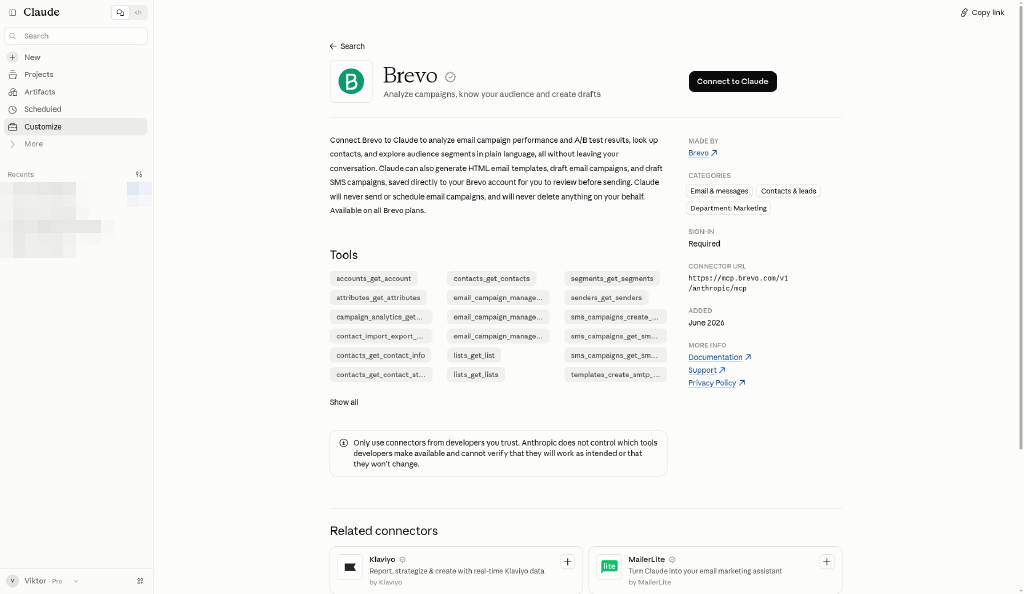
Test it: “Using Brevo, list my last 5 email campaigns with their send dates.”
The Brevo connector reads your account, contacts, lists and stats, and can create draft or scheduled email and SMS campaigns. It can’t send now, edit existing campaigns, or add or import contacts. It can also create and read email templates and read A/B test results and segments. One honest footnote: its tool list in Claude’s directory includes a tool for sending a test of a template (Brevo connector listing), so if Claude ever offers to send a test, check who it’s going to. A scheduled campaign goes out at its set time, so ask Claude for drafts only and schedule them yourself in Brevo.
Why I’d skip the MCP server for audits
Brevo has a second official option: the Brevo MCP server, set up with an API key in Claude Desktop or Claude Code. It reaches much more of your account (CRM, senders, domains, webhooks and more, depending on the key), and Brevo’s own docs list modules that can create and send SMS and WhatsApp campaigns (Brevo MCP docs).
| Brevo connector (Claude directory) | Brevo MCP server | |
|---|---|---|
| Setup | Customize → Connectors → Brevo → Authorize | API key with the MCP option + config file or CLI |
| Reads campaigns, A/B tests, contacts, lists, segments | Yes | Yes, and more |
| Saves campaign drafts | Yes | Yes |
| Sends a campaign now | No | Some modules can send |
| Schedules a new campaign | Yes | Has modules to create and manage campaigns |
| Good for an audit | Yes | More access than you need |
An audit only needs to read, so the prompt is written so Claude only reads.
How do I run the audit with Claude?
Open a new chat with Brevo turned on (+ → Connectors → Brevo) and paste the prompt. You can change the number of campaigns or the time window.
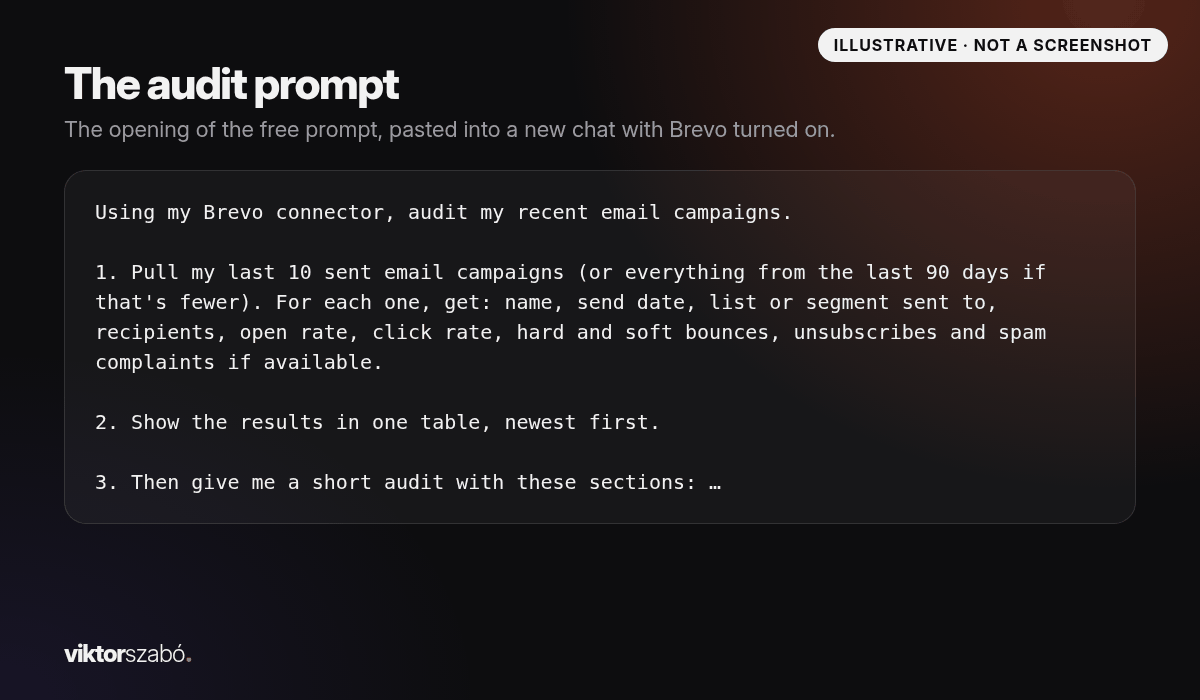
The prompt asks Claude to pull, for each campaign: name, send date, the list or segment, recipients, open rate, click rate, hard and soft bounces, unsubscribes, and spam complaints if Brevo has them. It shows everything in one table, newest first, and then writes the five sections above.
The rules matter more than the sections. The prompt tells Claude to:
- use only data it retrieves from Brevo, with no invented numbers, benchmarks or industry averages
- show the math for every rate it works out, and double-check counts
- keep facts separate from its interpretation and state its confidence
- create, send, schedule and delete nothing, because the audit is read-only
- stay under 400 words, not counting the tables
What does the audit look like?
Example (fictional list, not real numbers)
This is a real test run of the shipped prompt through Claude (via the API), but on a made-up report pasted in, not a live Brevo account. I’ve shortened it. Your table will have your own campaigns, and the wording will differ.
| Campaign | Sent | List | Recipients | Open | Click | Hard bounce | Unsubs |
|---|---|---|---|---|---|---|---|
| Oct tips | 2026-10-13 | Newsletter | 2,050 | 39.4% | 5.2% | 4 (0.20%) | 6 (0.29%) |
| Autumn sale | 2026-10-02 | Customers | 410 | 52.0% | 12.4% | 0 | 1 (0.24%) |
| Sept recap | 2026-09-22 | Newsletter | 2,010 | 31.8% | 2.1% | 5 (0.25%) | 9 (0.45%) |
| Imported leads hello | 2026-09-15 | Event leads (imported) | 880 | 14.6% | 0.9% | 61 (6.93%) | 17 (1.93%) |
| New template | 2026-09-08 | Newsletter | 1,990 | 42.7% | 6.8% | 3 (0.15%) | 4 (0.20%) |
| Back to work | 2026-08-31 | Newsletter | 1,975 | 37.1% | 4.0% | 4 (0.20%) | 5 (0.25%) |
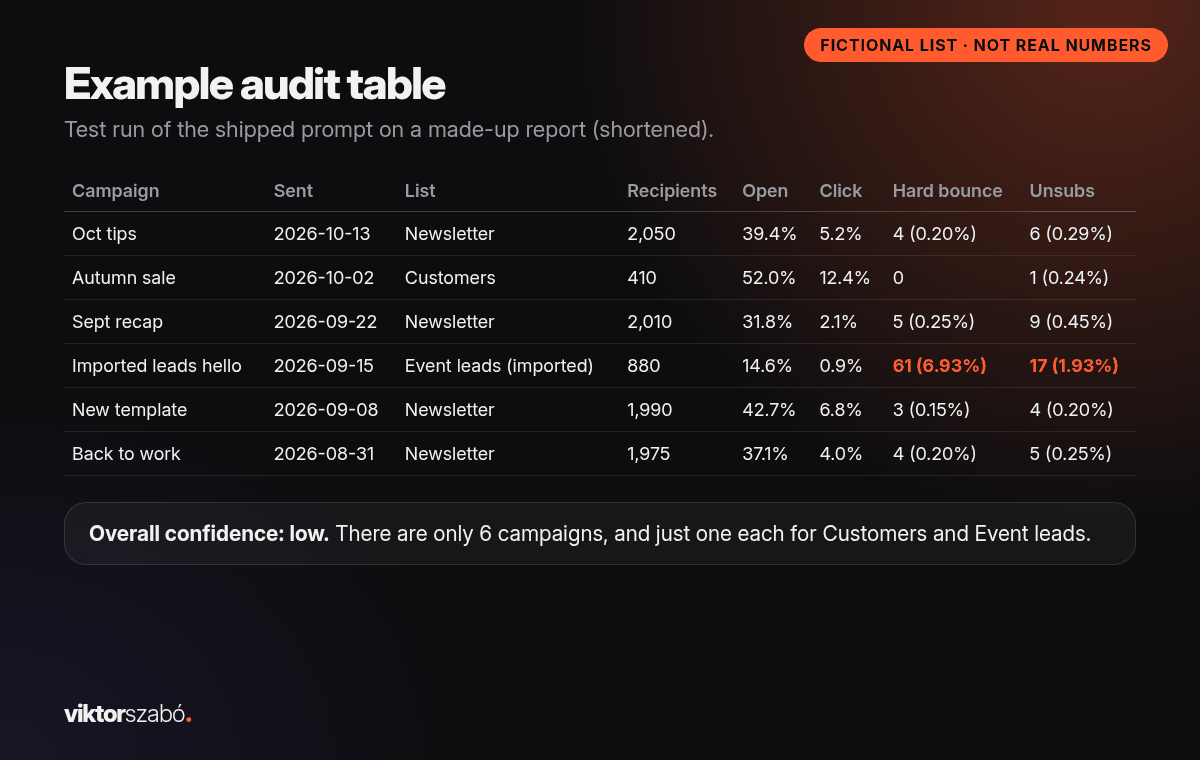
Under the table, Claude wrote “Overall confidence: low. There are only 6 campaigns, and just one each for Customers and Event leads.” That’s the behaviour I want.
Top and bottom campaigns
Best: Autumn sale and New template. Weakest: Imported leads hello and Sept recap. Claude marked its explanations as interpretation, such as Autumn sale going to a small customer list with a deadline offer.
Subject-line patterns
On the newsletter list, the question subject (“Is your planner working for you?”) had the highest opens and the generic “September recap” the lowest. Claude added that each pattern rests on one email, “so treat these as hunches.” Good.
Segment differences
Customers beat the newsletter list and the imported leads did worse, but with one campaign each, confidence stayed low.
Deliverability flags
The imported list stood out: a 6.93% hard bounce rate against 0–0.25% for every other campaign, plus the highest unsubscribes and spam complaints. Claude listed what to check rather than a verdict: how the leads were collected, consent, and whether to re-confirm the rest before emailing them again.
Why can open rate alone fool you?
Apple’s Mail Privacy Protection “prevents senders from seeing if you’ve opened the email message they sent you” (Apple Support), so opens from those readers can’t be measured the normal way. Published benchmarks also vary a lot by source and industry.
Two habits help:
- Compare against yourself. Your own last 10 sends are a better baseline than any industry average. That’s why the prompt bans benchmarks.
- Look at clicks and click-to-open. Clicks show someone acted. Click-to-open (clicks ÷ opens) shows whether the email delivered on its subject line. In the example, Autumn sale’s click-to-open was 23.8%, the highest of the six.
How do I turn the audit into next actions?
The prompt ends with three next actions, each tied to something in the data. In the fictional example they were:
- Use a specific, benefit-led subject or a question for the next newsletter instead of a generic label like “recap”.
- Test one clear deadline or offer with the newsletter list.
- Hold off on emailing the remaining imported leads until consent is checked and the list is cleaned.
Pick one, make the change yourself in Brevo, and rerun the audit after a few more sends. One change at a time tells you what worked.
If you want Claude to plan the next campaign too, from segments and a sending schedule to copy saved as a Brevo draft and a pre-send check, that’s what the Brevo + Claude: Campaign Planner Pack ($24) is for. It has 8 copy-ready prompts, an installable skill that only ever creates drafts, and a real analysis I ran on an email list I manage (one account’s numbers, not a benchmark).
The same “read first, change nothing” approach works outside email marketing. My inbox zero post uses it for Gmail, and the weekly status report template uses it for ops notes.
FAQ
What is an email marketing audit?
A review of your recent email campaigns that ranks them by opens and clicks, looks for patterns in subject lines and segments, flags deliverability problems such as bounces and unsubscribes, and ends with a few specific changes to try next.
Can Claude send emails from my Brevo account?
Not straight away through the Brevo connector in Claude’s directory. The Brevo connector reads your account, contacts, lists and stats, and can create draft or scheduled email and SMS campaigns. It can’t send now, edit existing campaigns, or add or import contacts. A scheduled campaign goes out at its set time, so ask for drafts only if you want to send yourself. The connector also has a tool for sending a test of a template. The separate Brevo MCP server has wider access, and some of its modules can send.
Do I need to code to run this audit?
No. You connect Brevo from Customize → Connectors with your Brevo login and paste one prompt into a chat. No API key is needed for the connector.
How many campaigns do I need for a useful audit?
The prompt uses your last 10 sent campaigns, or the last 90 days if that’s fewer. With fewer than 10 campaigns, or fewer than 3 per list, it rates its confidence as low, so treat any patterns as hunches.
What’s a good open rate in Brevo?
There’s no single number. Benchmarks vary by source and industry, and Apple’s Mail Privacy Protection hides whether some readers opened. Compare against your own recent sends and watch clicks and click-to-open.
Is the Brevo audit prompt free?
Yes. It’s a free (pay what you want) download on Gumroad: a PDF with three setup steps and the full prompt. It’s a free mini version of the $24 Brevo + Claude Campaign Planner Pack.