

THE AUTOMATED CONTENT SYSTEM
The Automated Content System.The bots draft, you approve.
I'll show you how to set up a small team of AI bots on Grok Bot that research, write, design and schedule your content. Each bot has one job. They all read the same rules. Nothing goes out without your yes.
Download the files
The 55 lessons and the 90 files they describe, free.
Download all files (ZIP) 209 KBDownload the guide (PDF) 7.0 MB
At a glance
What that gets you:
- A team of bots with one job each, and a written list of what each one must not do.
- A shared set of files every bot reads first: your brand brief, your approvals log, your routines.
- One daily message with every open question, so you answer in a few words.
- Ready-to-use files instead of blank pages: a starter website, a carousel template, a cover generator, a video starter project.
- My own setup as the worked example in every lesson, with what to change for yours.
Format: a text guide on this page. No videos, no calls, no community.
The problem in plain words
Building a brand online is a lot of separate jobs. Research what to post. Write it. Design it. Build and update a website. Post on each channel. Answer comments. Make video.
AI tools can do most of the production work now. The hard part is getting them to work together.
A bot starts each task fresh. If the facts it needs live in a chat from last week, it guesses. That is how a post ends up with the wrong price, or an offer that doesn't exist. Ask five bots to research on their own and you pay for the same search five times and get five versions of the same story.
So the problem isn't the tools. It's the setup around them: who does which job, which rules every bot reads, and where your yes comes in.
That setup is what this free guide teaches.
How the system works
- 01Import dr eggbottell it what you want to build
- 02Your teamstart with three bots
- 03Bots draftresearch, write, design, schedule
- 04You approveyes or no to everything
- 05It goes outonly after your yes
The workflow from Module 0.
My own team runs on Grok Bot. The free guide is that system, written up as steps you can follow for your brand.
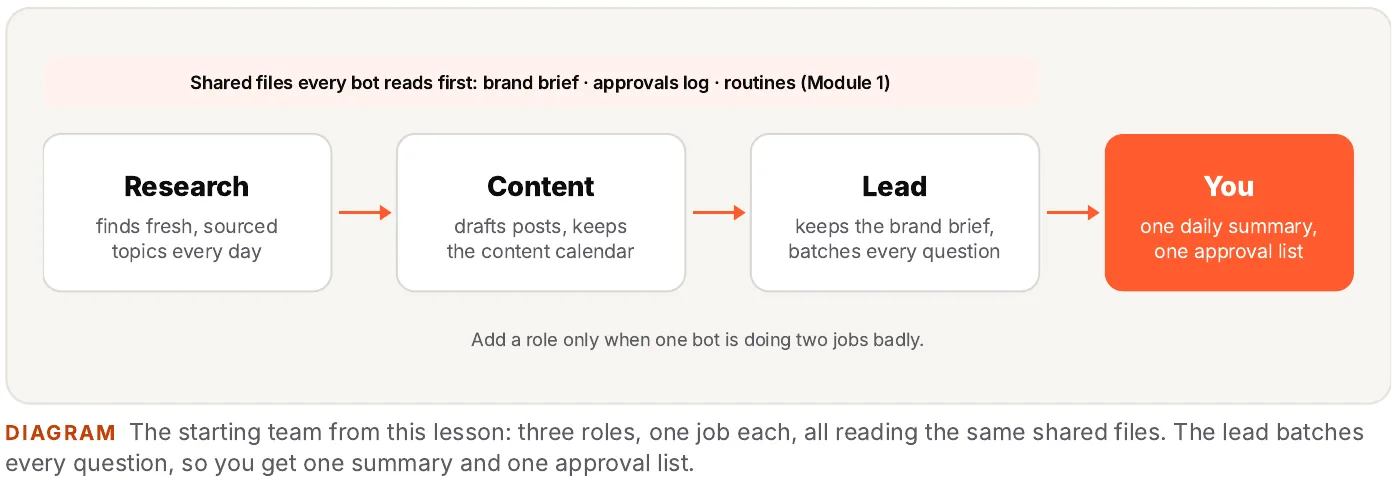
A lead bot, a content bot and a research bot are enough to start. You add a role only when one bot is doing two jobs badly.
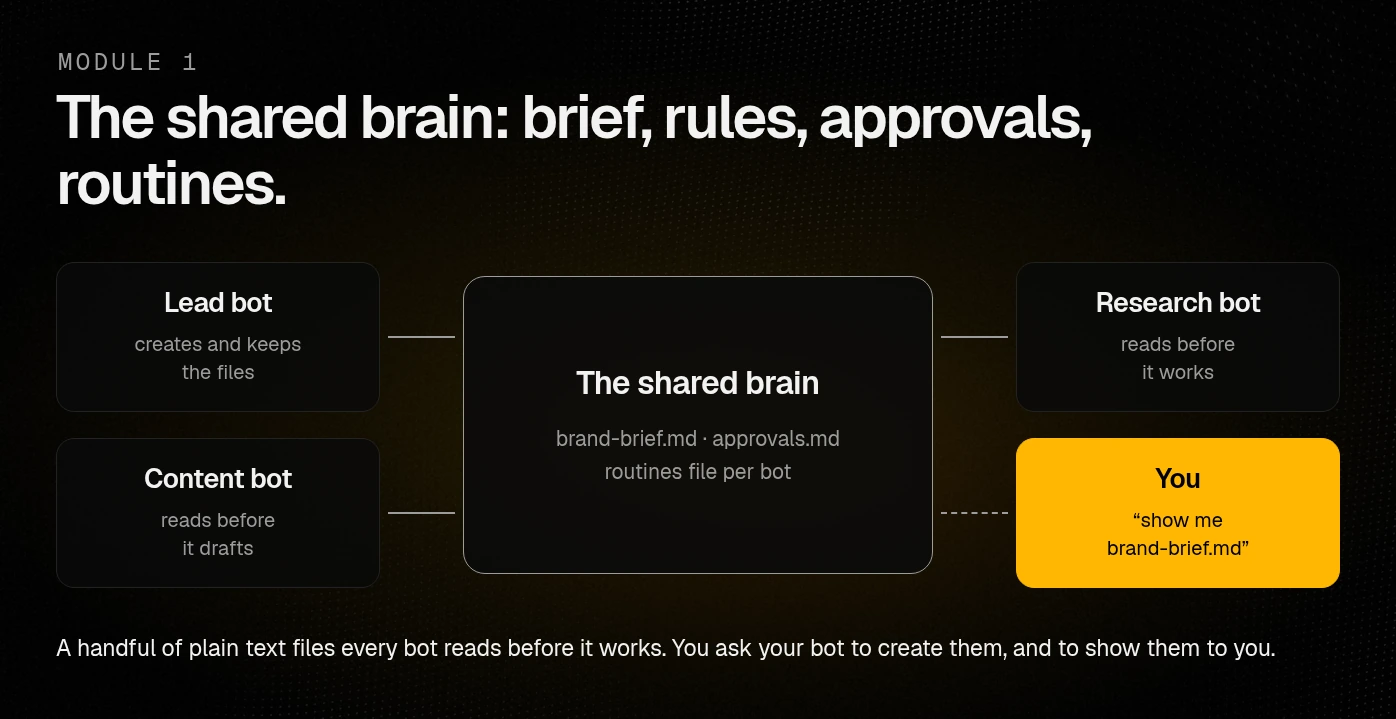
Every bot reads the same brand brief, approvals log and routines file before it works.
Nothing gets posted, sent or published, and no money is spent, without your yes.
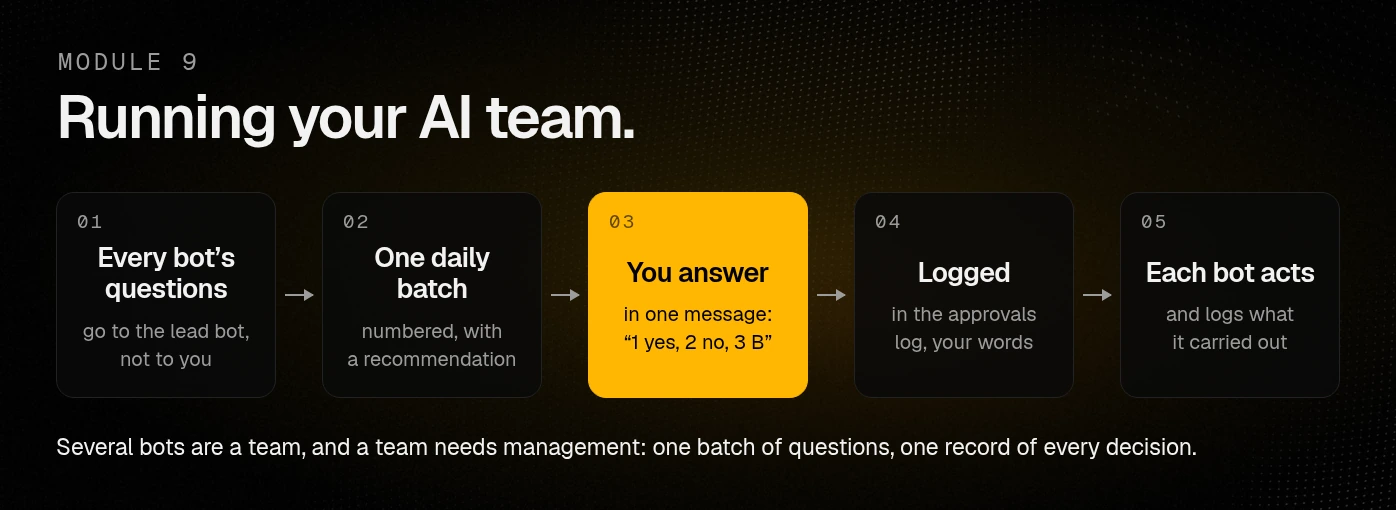
The lead bot batches every question into one numbered list with a recommendation for each.
"Automated" in this free guide always means this: the team does the production work, and you approve what goes out. Approvals, sign-ins, spending and taste stay with you.
Step one: import dr eggbot

- Open the Grok Bot marketplace and go to dr eggbot.
- Import it. You sign in and confirm the import yourself.
- Tell it what you want to build, in plain words: who you are, what your brand is about, which channels you want, and that bots draft and you approve.
- Answer its preference questions. It creates a team of bots for you.
- Read what it made: each bot's name, its one job, and what it must not do. Change anything that doesn't fit.
dr eggbot is made by someone else, not by me. What it creates depends on your answers, so Lesson 0.1 shows you how to check each bot before you use it.
Then the steps
- Read Module 0. The one rule, what stays human, the tool list.
- Ask your lead bot to create the shared files from the Module 1 templates: brand brief, approvals log and routines file. Ask it to show them to you in chat.
- Set your brand (Module 2): logo and brandbook.
- Turn on research (Module 3).
- Pick one channel (website, Instagram, X, YouTube or short video) and get it working before you add the next.
- Run the team day to day with Module 9.
You don't build folders or copy files around. You paste or attach a template in your bot's chat and say, for example: "Create brand-brief.md from this template and keep it current." The bot keeps the file in its workspace and shows it to you or attaches it whenever you ask. Scripts work the same way: you ask your bot to run them and attach the result.
The one rule

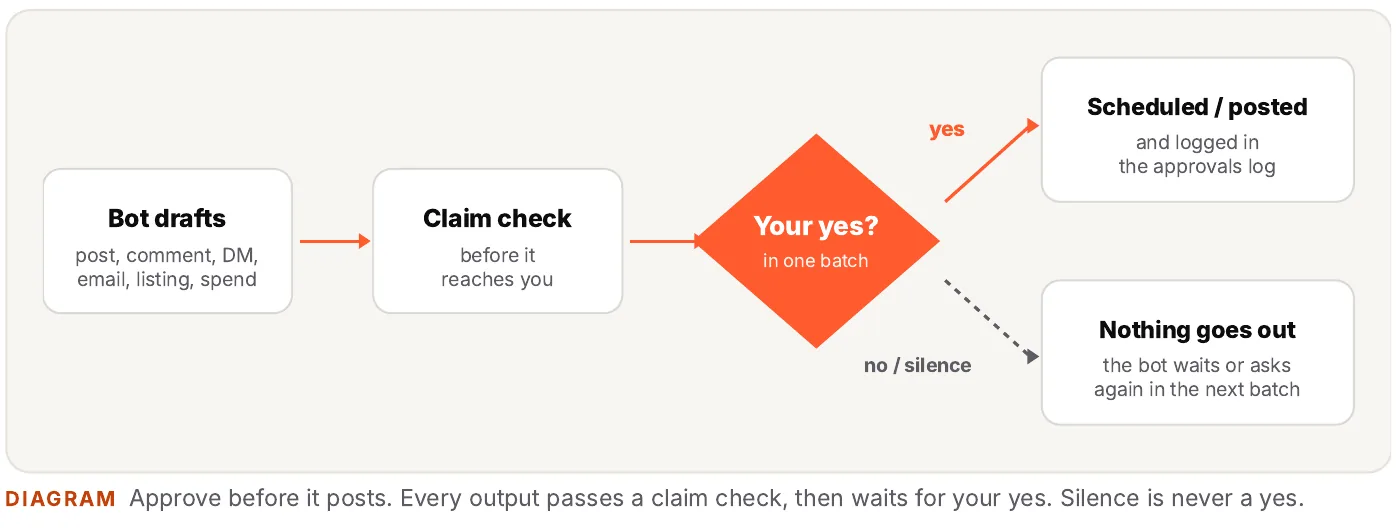
Every draft passes a claim check, then waits for your yes. Silence is never a yes. A bot that hears nothing waits or asks again in the next batch.
In my setup, the Instagram drafts routine runs every evening. It renders the next day's post and Stories, writes captions and alt text, and sends it all in one message. I reply once. Only after that yes does the bot schedule anything.
What you need
- Grok Bot access. The free guide is built around Grok Bot. dr eggbot is on the Grok Bot marketplace.
- Your own accounts for the channels and tools you pick. You create them and sign in yourself.
- Time to read and approve. The team asks you every day.
Tools I use or name in the free guide, by job:
| Job | Tool |
|---|---|
| The AI team | Grok Bot, starting with dr eggbot |
| Website hosting | Cloudflare Workers, or any static host |
| Contact form | FormSubmit |
| Instagram publishing | Instagram API through a Composio connector |
| Comment-to-DM | ManyChat: manychat.com (affiliate link) |
| Avatar poses (optional), short video | Higgsfield: higgsfield.ai (affiliate link) |
| Voice clone (optional, your own voice only) | ElevenLabs |
| Talking avatar video (optional) | Hedra |
| Video editing in code | Remotion |
| X scheduling | X's own scheduler, Tweet Hunter |
| Scheduling across channels (optional) | Postiz: postiz.pro (affiliate link) |
You don't need all of them. Start with the AI team, a website host and one channel. Many of these tools have a free tier; some are paid plans, and AI image and video tools use credits. I list no prices because they change. Check each tool's own pricing page before you pay. You can swap most tools for ones you already use.
Links marked "affiliate link" earn me a commission if you sign up, at no extra cost to you. You don't need any linked tool to follow the method.
Module by module
Lesson counts include each module's overview lesson.
Module 0 · Start here: what "automated, you approve" really means6 lessons · 3 files
Import dr eggbot, map your team, the one rule, what stays human, the tool list.
You'll have: a starting team of bots and a clear line between their work and yours.
- Overview
- 0.1 First step: import dr eggbot and let it set up your team
- 0.2 Your team of bots: who does what, and who hands work to whom
- 0.3 The one rule: bots draft, you approve
- 0.4 What you still do yourself
- 0.5 The tool list
Module 1 · The shared brain: brief, rules, approvals, routines5 lessons · 5 files
Your lead bot creates and keeps a brand brief, an approvals log and a routines file. Honesty rules and a claim-check prompt.
You'll have: the files every bot reads before it works, and a written record of every yes.

- Overview
- 1.1 The brand brief every bot reads first
- 1.2 The approvals log: every yes, written down
- 1.3 The routines file
- 1.4 Honesty rules: no income claims, no invented stats, claim checks
Module 2 · Brand: logo, brandbook, and an optional avatar5 lessons · 6 files
Three logo directions to pick from, a brandbook every bot follows, and a cover generator script your bot runs. Plus the optional avatar bonus.
You'll have: one look across every image, page and post.
- Overview
- 2.1 Three logo directions, pick the simplest
- 2.2 The brandbook as the source of truth for every bot
- 2.3 Bonus: avatar (optional)
- 2.4 The cover generator: every cover image in one style
Module 3 · Research engine: never run out of fresh ideas4 lessons · 4 files
A daily trend feed for your niche, post ideas for each channel, and a weekly trend brief.
You'll have: one research bot, one shared feed, sources tagged by how sure the bot is.
- Overview
- 3.1 The daily trend feed routine
- 3.2 Turning the feed into post ideas for each channel
- 3.3 The weekly trend brief
Module 4 · A website your bots build and update6 lessons · 17 files
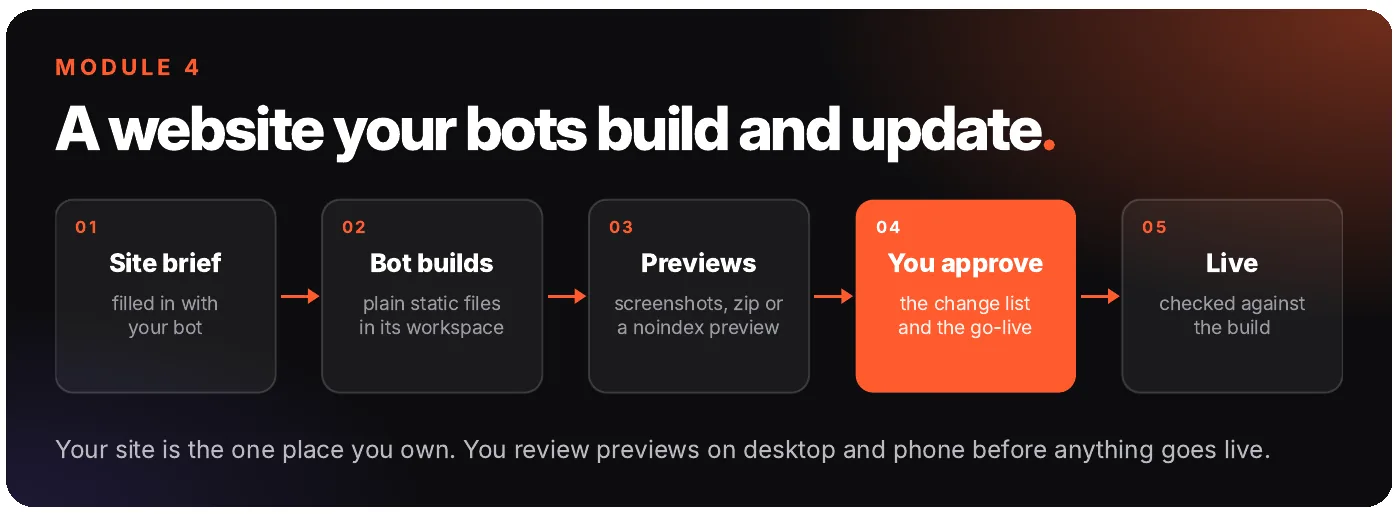
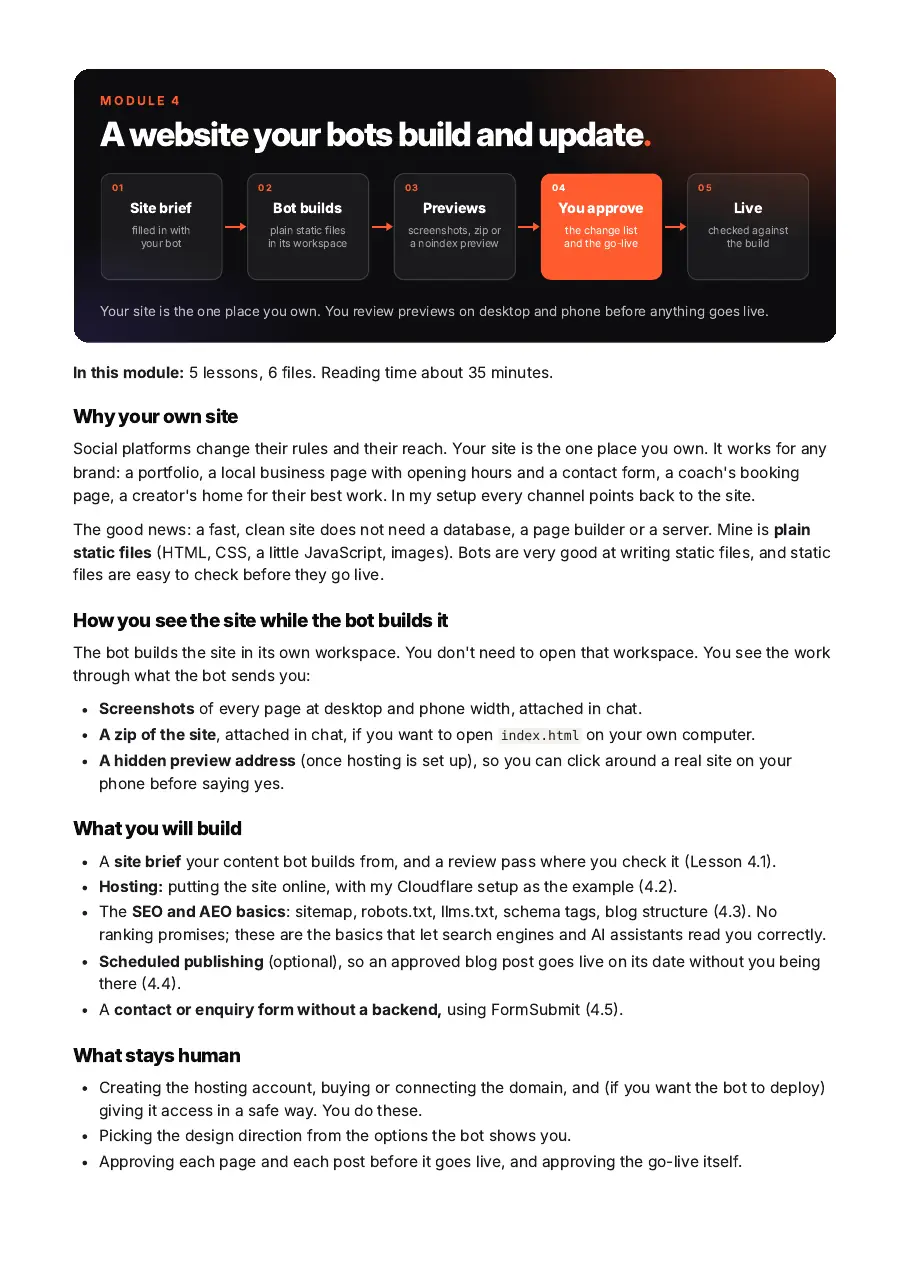
A site brief, the bot's build, your review of the previews, two ways to get it online, SEO and AEO basics, optional scheduled publishing, and contact forms without a backend.
You'll have: a static site you review on your phone before anything goes live.

- Overview
- 4.1 Site brief → your bot builds → you review the previews
- 4.2 Hosting: putting the site online
- 4.3 SEO and AEO basics
- 4.4 Scheduled publishing: approved posts go live on their date (optional)
- 4.5 Contact forms without a backend (FormSubmit)
Module 5 · Instagram, published for you (after your yes)7 lessons · 11 files
A daily drafts routine, carousels and Stories in your brand style, publishing through the API, comment-to-DM with ManyChat, and engagement batches.
You'll have: tomorrow's set in one message, scheduled only after you reply.
- Overview
- 5.1 The daily drafts routine: tomorrow's set in one message
- 5.2 Rendering carousels and Stories in the brand style
- 5.3 Publishing through the API
- 5.4 "API-publishable only": no manual steps in your drafts
- 5.5 Comment-to-DM with ManyChat: links only by DM
- 5.6 Engagement: comment batches for quick approval
Module 6 · X: scheduled posts, replies, honest scoreboard5 lessons · 5 files
Weekly batches, reply drafts and when a standing permission makes sense, a post-score tracker script, and an optional weekly scoreboard.
You'll have: a week of posts approved in one go, and a simple score to learn from.
- Overview
- 6.1 Weekly batches into the scheduler
- 6.2 Replies, and when a standing permission makes sense
- 6.3 The post-score tracker
- 6.4 The weekly scoreboard, flat weeks included (optional)
Module 7 · YouTube without a camera8 lessons · 19 files
Script and claim check, narration in your own voice (recorded or cloned), screen captures done by the bot, the edit in Remotion, music mix and captions, thumbnails and upload. An optional bonus lesson covers an avatar presenter.
You'll have: a full pipeline for a tutorial video with no filming, and your yes at the script, the cut, the thumbnail and the publish button.
- Overview
- 7.1 Script and claim check
- 7.2 Narration in your own voice: recorded or cloned
- 7.3 Bonus: avatar render (optional, if you chose the bonus avatar)
- 7.4 Screen captures and other visuals, done by the bot
- 7.5 The Remotion edit
- 7.6 Music, mix to -14 LUFS, captions
- 7.7 Thumbnails, metadata, upload, pinned comment
Module 8 · Reels and short video3 lessons · 4 files
A monthly credit plan so nothing goes unused or over budget, and a Reels house style.
You'll have: one bot that owns every AI video spend, with a plan you approve.
- Overview
- 8.1 A monthly credit plan, so nothing goes unused
- 8.2 Reels style: what the polished accounts do
Module 9 · Running your AI team6 lessons · 16 files
A lead bot's daily summary and batched decisions, daily self-review per bot, a maintenance bot, handoffs through shared files, and what to switch off.
You'll have: one daily batch of decisions you answer in a single message.

- Overview
- 9.1 The CEO bot: daily summary and batched decisions
- 9.2 Daily self-review per bot
- 9.3 The maintenance bot: chat and routine healthchecks
- 9.4 Handoffs through shared files, not memory
- 9.5 What to switch off
Download the files
The 55 lessons and the 90 files they describe, free.
Download all files (ZIP) 209 KBDownload the guide (PDF) 7.0 MB
A look inside
Real examples from my setup that the lessons walk through:
The team wrote the script, checked every claim, narrated it in my cloned voice, recorded the screen, edited it in code, mixed the music and prepared the upload. I approved the script, the fixes, the final cut and the thumbnail. It took five cuts, so plan for revisions on your first one.
Once I answered more than twenty decisions from across the team in one message, mostly a word or two each, because the bots had done the research and made a recommendation for each.
A queue check found a scheduled post with an out-of-date fact about what I offer. The fix came to me as one yes or no.
My X bot may post short replies without asking each time. It logs every reply, sends me a one-line count each day, and reports any platform warning at once.
Where an example in the free guide is made up, the lesson says so.
The files the lessons cover, plus an optional avatar bonus
The lessons describe 90 files, sorted by module. You ask your bot to create and keep them. A few of the ones the modules cover:
A starter website (Module 4): home, about, blog, first post, 404 page, sitemap, robots.txt and llms.txt.
A carousel template (Module 5): three HTML slides, a stylesheet and a render script.
A Remotion starter project (Module 7) for editing video in code, plus a mix script and QC tools.
A cover generator (Module 2): a Python script your bot runs to make every cover in one style.
A post-score tracker script (Module 6).
Role prompts for 10 roles plus a maintenance bot (Module 9), from CEO and CMO to research, short video and SEO.
Templates for the brand brief, approvals log, routines file, brandbook, site brief, scripts and more.
# files, one folder per module
00-start-here/           3 files
01-shared-brain/         5 files
02-brand/                6 files
03-research/             4 files
04-website/             17 files
05-instagram/           11 files
06-x/                    5 files
07-youtube/             19 files
08-short-video/          4 files
09-running-the-team/    16 files
                        90 files in total
You ask your bot to create and keep these files, and to run the scripts and attach the result. If you prefer, you can keep files and run scripts on your own computer.
Bonus: an avatar (optional)
Two bonus lessons (2.3 and 7.3) show how I made an illustrated avatar and a pose library my bots drop into carousels and thumbnails, and how to use an avatar as a video presenter. It comes with a pose prompt template.
What it looks like is your choice: a character, a stylised look, or your own likeness. Check each platform's rules on labelling AI-generated images and video.
Not everyone wants an avatar, and nothing else in the free guide depends on it. Skip it if you'll use your own photos, your logo, or no face at all.

Who it's for, and who it's not for
It's for you if you're building a brand and want:
- a small team of bots doing the production work, with you approving every post, send and spend
- one method you can adapt, whether you're a creator, freelancer, coach, consultant, artist, or a small or local business
- to start with one channel and add more later
- the lesson list on this page, which you can work through at your own pace
It's not for you if you want:
- bots that post on their own without review. Every lesson keeps your yes in the loop.
- a promise of followers, sales, clients or rankings. I don't make one.
- video lessons, live calls, coaching or a community. This is text and files.
- someone else to create your accounts, sign in or pay for tools. Those steps stay with you.

About me
I’m Viktor Szabó (@itsviktorszabo). I run AI experiments and write them down: what worked, and what didn’t. I work with Claude and Grok Bot. Free guides are on viktorszabo.com.
My own brand runs on a team of bots on Grok Bot. This free guide is that setup, written up so you can build your own. In every lesson I show how I did it, then tell you what to change for your brand.
Free on this page
This guide is free to read here.
FAQ
What is on this page?
The method, the steps, the tool list, and 55 lessons listed across 10 modules. You read it here.
Is it videos?
No. It's a text guide on this page. There are no screen recordings, live calls or community.
Which AI tools does it use?
The team runs on Grok Bot, and the first step is a bot on the Grok Bot marketplace. Other tools are per channel (see "What you need"). You can swap most of them for tools you already use.
Do I need to code?
The free guide doesn't ask you to write code. Where there is code, like the starter site, the cover generator or the video starter, you ask your bot to run or change it and show you the result.
Is it beginner-friendly?
Every lesson lists what to ask your bot and what you do yourself, in order. Start with Module 0 and one channel. You do need to create your own accounts, sign in, and read what your bots make.
How long does it take?
The reading adds up to about five hours across all modules. Setting up takes longer and depends on how many channels you pick. Start with one and add the next when it works.
I don't have an audience yet. Is it still for me?
Yes. The free guide teaches the setup: the team, the shared files, the approvals and the channel routines. It doesn't depend on an existing audience, and it doesn't promise you one.
Do I need an avatar or to show my face?
No. The avatar is an optional bonus. The YouTube module works with your voice, screen captures and visuals that aren't footage of you.
How much do the tools cost?
These lessons don't include a subscription to any tool. Many have a free tier; some are paid or use credits. I list no prices because they change, so check each tool's pricing page. You don't need all of them to start.
Is this free?
Yes. You can read it on this page.
Is this a guarantee of results?
No. I make no promises about followers, sales, clients or rankings. The free guide teaches the method. What it brings you depends on your brand and your audience.
Your team drafts. You decide what goes out.
Start with step one: import dr eggbot, tell it what you want to build, and follow the modules on this page. My own setup is the example.
Some links on this page are affiliate links (marked).